


SpongeBob Adventures: In A Jam
4.64.50K Reviews
App Specs
- Version
- 2.35.1
- Updated On
- License
- Free
- Downloads
- 10,000,000+
- Developer
- Tilting Point
- Categories
- Simulation
- Platform
- Android
Screenshots

 Analysis by AppCompare
If you’re coming to SpongeBob Adventures: In A Jam for the first time, it helps to know what kind of game you’re opening: this is a light-hearted simulation with an adventure wrapped around its familiar cartoon world. I found it easiest to enjoy when I treated it as a series of small jobs rather than a game to rush through. The first satisfying stretch comes from learning how its quests, puzzles, and resource tasks fit together, then using that rhythm to make steady progress.
Who will feel at home here
I’d recommend it first to SpongeBob fans who like spending time with recognizable characters and places, but it can also suit someone who wants a gentle mobile game with clear tasks. Its Everyone age rating fits the playful tone, and the humor makes it approachable for younger players while still giving adults a pleasant dose of Bikini Bottom nostalgia. Tilting Point is the developer, and the game is free to start, so it’s easy to try without making a purchase first.
The trade-off is that this isn’t the best match for every mobile player. If you want a fast action game, a deep strategy challenge, or a simulation that feels realistic, the colorful setting won’t change the basic nature of the experience. I’d also look elsewhere if you dislike juggling objectives and resources, or if you expect a fully open-ended world with no quest direction. The game is at its best when you enjoy having a specific next task to tackle.
A comfortable first session
When I install a new mobile game, I prefer to get through its opening tasks before deciding whether it belongs in my regular rotation. Here, I’d start by following the on-screen quest prompts instead of wandering between activities at random. That gives the story and task flow room to introduce themselves, and it makes the first useful goal feel manageable: complete a request, collect what it asks for, and see how that result helps move the adventure forward.
For a first meaningful success, focus on finishing one objective cleanly rather than trying to do everything at once. If a task involves gathering something, check what the request needs before spending time on other collections. If it asks you to make or prepare something, treat that as a short chain of steps and work through them in order. That simple habit makes the resource side less confusing and gives each action a purpose.
A realistic way to play is to open the game during a short break, check the current quest, and choose one small goal you can finish before putting your phone away. On a bus ride or while waiting for an appointment, I’d rather complete one clear task than start several and lose track of what each one needs. That approach suits the game’s gentle pace and makes returning later feel less like catching up on homework.
Making the task loop work for you
The useful skill here is not speed but prioritizing. Quests can point you toward what matters next, while resource gathering and crafting give you intermediate steps. Before spending effort on a side activity, I’d look at the active objective and ask whether the item or action will help complete it. This is a small planning trick, but it can cut down on aimless tapping and make progress feel more deliberate.
Worth Reading Before You Choose

EA SPORTS FC Mobile 26 Is a Bigger Football Game, but It Takes Time

Flipboard Shows What News Apps Must Do Beyond the Feed

Switching to Android Auto Means Rethinking Your Driving Routine

Google Calendar Makes a Crowded Week Easier to Manage

Ludo King Makes the Most of the Minutes Between Plans

Baby Panda World Brings Quick Play to Modern Phones, but Its Game Library Feels Busy
It’s also worth separating “I can do this now” from “I should do this now.” A collection or crafting task may be available, but if it doesn’t serve the current goal, it might be more satisfying to save it for later. I’d use the game’s character requests as a guide to what the next useful action is, while keeping an eye on the materials those requests involve. That way, you can avoid scattering your attention across too many unfinished jobs.
Compared with many mobile simulations that center on decorating or running a business, this one puts its SpongeBob story and adventure tasks in the foreground. Compared with action-heavy cartoon games, it gives you more room to plan and manage small objectives. That blend is its particular appeal, though it also means players looking for constant movement or a highly competitive challenge may prefer a different kind of game.
Costs, pace, and practical expectations
The game is free to download, with optional in-app purchases ranging from $0.49 to $119.99 per item. I’d recommend beginning without buying anything and seeing whether the normal quest-and-resource loop is enjoyable for you. If you ever consider a purchase, check its exact contents and price in the game first, and make sure it solves a frustration you actually have rather than simply being a spur-of-the-moment choice.
There is a real pacing trade-off in a game built around tasks and resources: progress can feel less immediate when the next objective depends on gathering or preparing something. I wouldn’t treat every pause as a reason to spend. Instead, switch to another available activity or stop for a while and return later. If you want a game where every minute delivers a new dramatic event, this may feel too measured; if you like small, steady goals, the same rhythm can be relaxing.
For a smoother first run, keep the game updated and check that your device meets its minimum operating-system requirement of version 8.0. The current version is 2.30.0. It has a 4.6 average from around 124,000 ratings, and more than 10 million installs; those figures suggest a large audience, but they don’t tell you whether its particular pace will suit you. I’d use the opening quests as the better test: do you enjoy the characters, and does completing one task make you want to try the next?
Welcome to Bikini Bottom
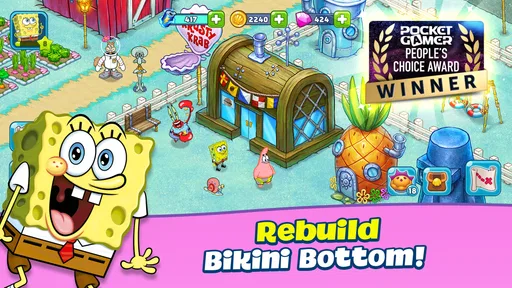
As soon as you fire up SpongeBob Adventures: In A Jam, you’re immediately transported to the vibrant, wacky world of Bikini Bottom. The graphics are colorful and true to the original cartoon series, capturing all the goofy charm and humor we’ve come to love. From SpongeBob’s pineapple house to the Krusty Krab, the game does a fantastic job of recreating the familiar locales.
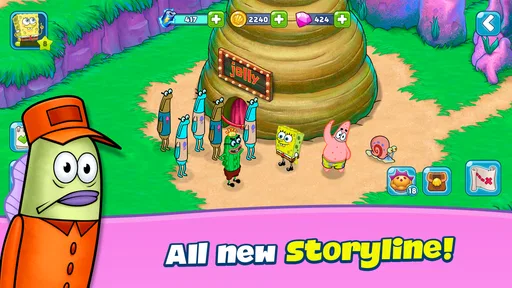
Now, what’s the jam, you ask? Well, Bikini Bottom is in a bit of a sticky situation. Plankton’s up to no good again, and it’s up to you, alongside SpongeBob and his friends, to save the day. The storyline is light-hearted and fun, perfectly suited for players of all ages. You’ll find yourself chuckling at the dialogues and quirky quests.
Gameplay and Features
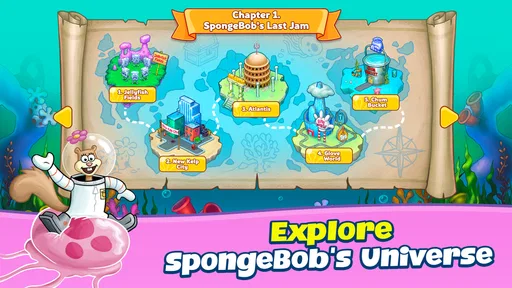
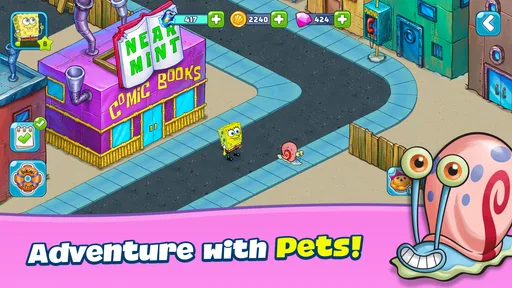
The gameplay is a delightful mix of adventure and strategy. You’ll be tasked with solving puzzles, completing quests, and managing resources to help SpongeBob and his pals. The controls are intuitive and easy to master. Whether you’re collecting jellyfish or crafting new recipes, the game keeps you engaged with its variety of tasks.
One of the standout features is the ability to interact with beloved characters like Patrick, Sandy, and Squidward. Each character has their unique missions and abilities, keeping the gameplay fresh and exciting. Plus, the game introduces a host of new characters and surprises that’ll keep you on your toes.
Visuals and Sound
I have to give a shout-out to the developers for the visual and audio components of the game. The graphics are sharp and vibrant, making every level a visual treat. The attention to detail is impressive, from the bubbles to the underwater flora.
Meanwhile, the sound effects and music are spot-on. Hearing the iconic theme song and character voices immediately puts you in the SpongeBob spirit. The voice acting is top-notch, adding an extra layer of authenticity to the game. You’ll feel like you’re part of an episode!
Fun Factor and Replayability
What I love about SpongeBob Adventures: In A Jam is its ability to make you smile. The game doesn’t take itself too seriously, allowing you to just kick back and enjoy the ride. The humor and charm are infectious, making it a joy to play.
In terms of replayability, the game offers plenty of it. With regular updates and new quests, there’s always something new to explore. The developers have done a fantastic job ensuring players have a reason to return to Bikini Bottom time and time again.
Final Thoughts
In a world of countless mobile games, SpongeBob Adventures: In A Jam stands out for its creativity, humor, and engaging gameplay. Whether you’re a die-hard SpongeBob fan or just looking for a fun game to pass the time, this one’s worth a download.
So, are you ready to dive into the underwater chaos of Bikini Bottom? Trust me, you won’t regret it. Grab your jellyfish net and get ready for an adventure full of laughs and challenges. Happy gaming!
Pros
- Immersive underwater graphics.
- Engaging storyline with familiar characters.
- Variety of fun mini-games.
- Frequent updates with new content.
- Kid-friendly and easy to navigate.
Cons
- Requires constant internet connection.
- In-app purchases can add up.
- Limited offline play features.
- Some tasks can feel repetitive.
- Occasional ad interruptions.
FAQs for SpongeBob Adventures: In A Jam
What is SpongeBob Adventures: In A Jam about?
SpongeBob Adventures: In A Jam is a fun and engaging mobile game where players join SpongeBob and friends to save Bikini Bottom from various challenges. The game involves solving puzzles, completing missions, and collecting resources to restore the underwater world. Its vibrant graphics and familiar characters make it a delightful experience for fans.
Is SpongeBob Adventures: In A Jam free to play?
Yes, SpongeBob Adventures: In A Jam is free to download and play. However, the game offers in-app purchases that allow players to buy items, power-ups, and other premium features to enhance their gameplay. While optional, these purchases can help speed up progress or unlock exclusive content.
What devices are compatible with SpongeBob Adventures: In A Jam?
SpongeBob Adventures: In A Jam is available for both Android and iOS devices. It requires Android version 5.0 or higher and iOS version 10.0 or later. Ensure your device meets these requirements for optimal performance and a smooth gaming experience without technical issues.
Does SpongeBob Adventures: In A Jam require an internet connection?
Yes, an internet connection is required to play SpongeBob Adventures: In A Jam. The game relies on network connectivity for downloading updates, accessing new content, and syncing progress with the cloud. A stable Wi-Fi connection is recommended to avoid data charges and ensure seamless gameplay.
Are there any parental controls in SpongeBob Adventures: In A Jam?
SpongeBob Adventures: In A Jam includes some parental control features, which allow parents to manage in-app purchases and monitor gameplay. Parents can set up restrictions on spending and screen time through their device’s settings to ensure a safe and controlled gaming environment for children.


